> For the complete documentation index, see [llms.txt](https://helpcenter.etron.info/llms.txt). Markdown versions of documentation pages are available by appending `.md` to page URLs; this page is available as [Markdown](https://helpcenter.etron.info/verwaltungsoberflache/konfiguration/kommunikation/kalender-erinnerungen.md).
# Kalender: Erinnerungen
> *Konfiguration -> Kommunikation -> Kalender: Erinnerungen*
## Erinnerungen
### Übersicht
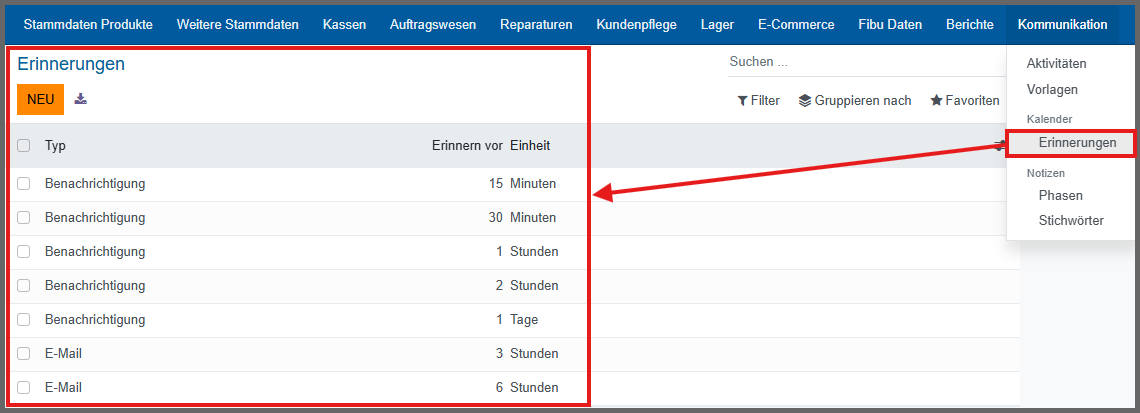
Konfiguration -> Kalender - Erinnerungen
Es wird eine Übersicht über die automatischen Erinnerungen bereitgestellt, die entweder per E-Mail oder als Benachrichtigung erfolgen.
### Anlegen
Um eine Erinnerung anzulegen, auf den Button klicken.
#### Typ
* E-Mail: die Erinnerung erfolgt durch das Versenden einer E-Mail.
* Benachrichtigung: die Erinnerung erfolgt durch eine Benachrichtigung
#### E-Mail-Vorlage
Vorlage für die Erinnerungs-E-Mail. Auf Grundlage dieser E-Mail-Vorlage gestaltet sich der Inhalt.
#### Erinnern vor
Wie lange vor dem Ereignis die Benachrichtigung oder E-Mail versendet werden soll, in Stunden angegeben.
---
# Agent Instructions
This documentation is published with GitBook. GitBook is the documentation platform designed so that both humans and AI agents can read, navigate, and reason over technical content effectively. Learn more at gitbook.com.
## Querying This Documentation
If you need additional information that is not directly available in this page, you can query the documentation dynamically by asking a question.
Perform an HTTP GET request on the current page URL with the `ask` query parameter, and the optional `goal` query parameter:
```
GET https://helpcenter.etron.info/verwaltungsoberflache/konfiguration/kommunikation/kalender-erinnerungen.md?ask=&goal=
```
`ask` is the immediate question: it should be specific, self-contained, and written in natural language.
`goal` is optional and describes the broader end goal you are ultimately trying to accomplish on behalf of the user. GitBook uses it to tailor the answer towards what is most useful for that goal.
The response will contain a direct answer to the question and relevant excerpts and sources from the documentation.
Use this mechanism when the answer is not explicitly present in the current page, you need clarification or additional context, or you want to retrieve related documentation sections.
 klicken.
