> For the complete documentation index, see [llms.txt](https://helpcenter.etron.info/llms.txt). Markdown versions of documentation pages are available by appending `.md` to page URLs; this page is available as [Markdown](https://helpcenter.etron.info/verwaltungsoberflache/fibu-daten/import.md).
# Import
{% hint style="success" %}
Modul: ETRON onRetail V2 DATEV FiBu Export
{% endhint %}
> *Fibu Daten* ➜ *Import*
Hier können DATEV-Dateien bzw. BMD-Dateien (Standard-Export von Zahlungen) importiert werden.
Eine Rechnungsreferenz mit einem Betrag wird mit den Journalen/Rechnungen abgeglichen (wie viel wurde von dem Kunden bereits bezahlt?)
Die gefundenen Zeilen [werden angezeigt und können importiert ](#import-bestaetigen)werden.
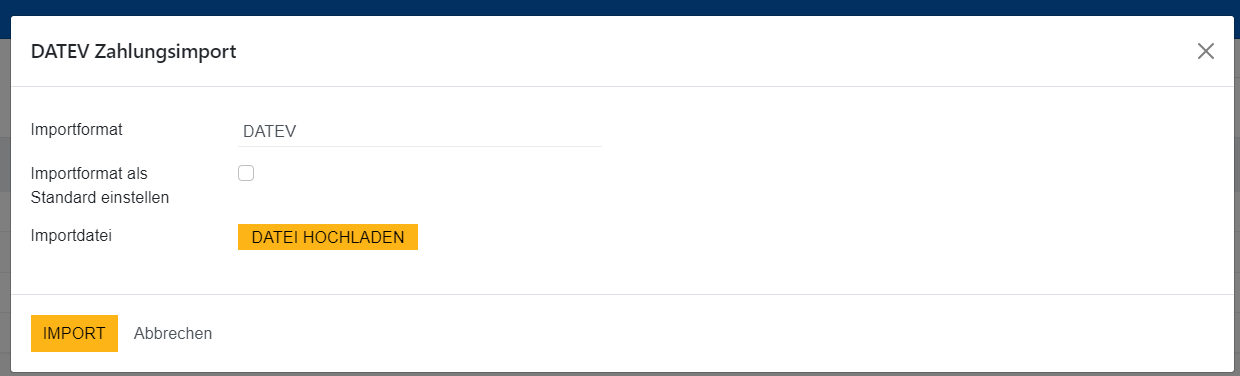
### Importformat
Das Format der zu importierenden Datei
### Importformat als Standard einstellen
Wenn gesetzt wird das angegebene Importformat automatisch vorgeschlagen
### Importdatei
Die zu importierende Datei kann hier hochgeladen werden
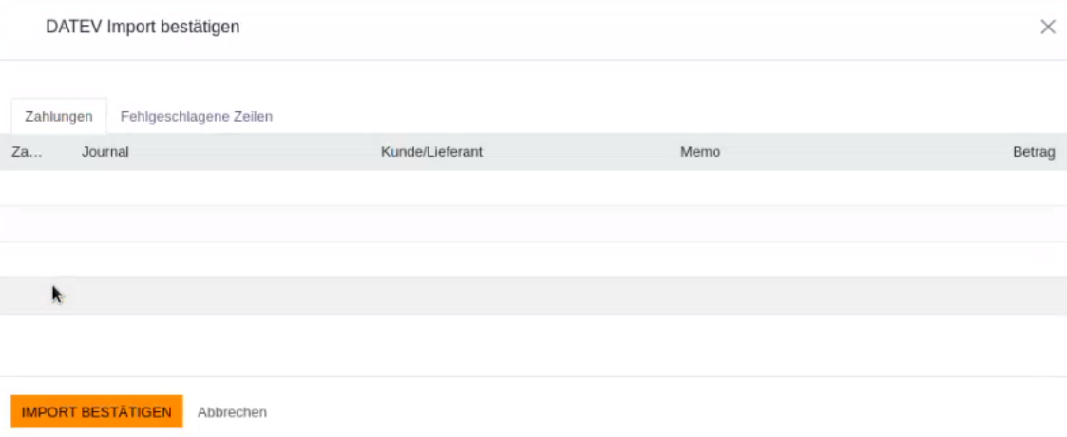
### Import bestätigen
Werden übereinstimmende Referenzen gefunden, werden diese unter "Zahlungen" angezeigt (Zahlungsmittel, Kunde, Rechnungsnummer, Betrag).
Zeilen, zu denen keine übereinstimmende Referenz gefunden wurde (z.B. weil bereits komplett bezahlt), werden unter ["Fehlgeschlagene Zeilen"](#user-content-fn-1)[^1] angezeigt"
Den Import von übereinstimmenden Referenzen kann man durch Klick auf den Button "Import bestätigen" durchführen.
[^1]:
---
# Agent Instructions
This documentation is published with GitBook. GitBook is the documentation platform designed so that both humans and AI agents can read, navigate, and reason over technical content effectively. Learn more at gitbook.com.
## Querying This Documentation
If you need additional information that is not directly available in this page, you can query the documentation by asking a question.
Perform an HTTP GET request on the following URL with the `ask` and `goal` query parameters:
```
GET https://helpcenter.etron.info/verwaltungsoberflache/fibu-daten/import.md?ask=&goal=
```
`ask` is the immediate question: it should be specific, self-contained, and written in natural language.
`goal` is what the user is ultimately trying to achieve, the reason they need the answer. Sharing it helps GitBook give you a better, more relevant answer. A goal is most helpful when it describes the outcome the user wants rather than restating the question. For example, with `ask=how do I create an API token`, a goal like `automate deployments from our CI pipeline` lets GitBook tailor the answer to that use case.
The response will contain a direct answer to the question and relevant excerpts and sources from the documentation.
Use this mechanism when the answer is not explicitly present in the current page, you need clarification or additional context, or you want to retrieve related documentation sections.
 ---
# Agent Instructions
This documentation is published with GitBook. GitBook is the documentation platform designed so that both humans and AI agents can read, navigate, and reason over technical content effectively. Learn more at gitbook.com.
## Querying This Documentation
If you need additional information that is not directly available in this page, you can query the documentation by asking a question.
Perform an HTTP GET request on the following URL with the `ask` and `goal` query parameters:
```
GET https://helpcenter.etron.info/verwaltungsoberflache/fibu-daten/import.md?ask=
---
# Agent Instructions
This documentation is published with GitBook. GitBook is the documentation platform designed so that both humans and AI agents can read, navigate, and reason over technical content effectively. Learn more at gitbook.com.
## Querying This Documentation
If you need additional information that is not directly available in this page, you can query the documentation by asking a question.
Perform an HTTP GET request on the following URL with the `ask` and `goal` query parameters:
```
GET https://helpcenter.etron.info/verwaltungsoberflache/fibu-daten/import.md?ask=