> For the complete documentation index, see [llms.txt](https://helpcenter.etron.info/llms.txt). Markdown versions of documentation pages are available by appending `.md` to page URLs; this page is available as [Markdown](https://helpcenter.etron.info/verwaltungsoberflache/berichte/kassen/fsn-analyse.md).

# 📊 FSN Analyse

> *Berichte -> Kassen -> FSN Analyse*

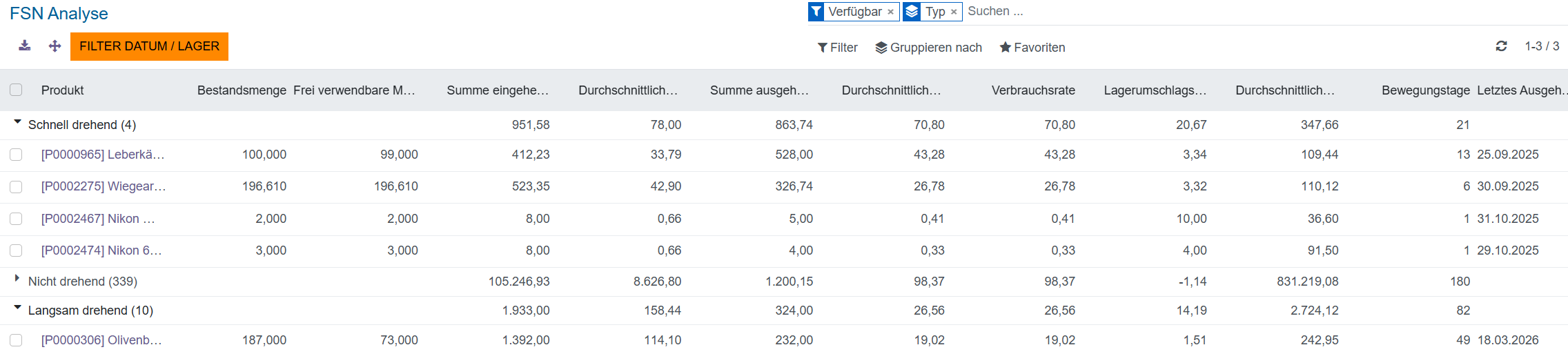
<div data-with-frame="true"><figure><img src="/files/v0pBMnkvq1xo38QJLPUU" alt="Ansicht FSN-Analyse"><figcaption><p>Ansicht FSN-Analyse</p></figcaption></figure></div>

In der Ansicht "FSN-Analyse" werden die verfügbaren Produkte nach den Klassen (Typ) schnell drehend, langsam drehend und nicht drehend gruppiert.

## Was ist die FSN-Analyse?

Die FSN-Analyse (Fast, Slow, Non-Moving) ist eine Methode zur Lagerbestandsklassifizierung: Artikel werden anhand ihrer Verbrauchs- und Umschlaggeschwindigkeit eingeteilt.&#x20;

<table><thead><tr><th width="125.666748046875">Kategorie</th><th width="207.3333740234375">Bedeutung</th><th width="158.111572265625">Wert Lagerumschlagshäufigkeit, ITR</th><th>Mögliche Maßnahmen</th></tr></thead><tbody><tr><td><strong>F –</strong> <br><strong>Fast Moving</strong></td><td>Schnell drehend:<br>hohe Verkaufsfrequenz</td><td>> 3</td><td><p></p><ul><li>ausreichenden Lagerbestand sicherstellen</li><li>Nachbestellprozesse optimieren</li></ul></td></tr><tr><td><strong>S –</strong> <br><strong>Slow Moving</strong></td><td>Langsam drehend:<br>geringe Verkaufsfrequenz</td><td>1-3</td><td><p></p><ul><li>Lagerbestand reduzieren</li><li>Marketingmaßnahmen prüfen</li></ul></td></tr><tr><td><strong>N –</strong> <br><strong>Non Moving</strong></td><td>Nicht drehend:<br>kaum Verkaufsfrequenz</td><td>&#x3C; 3</td><td><p></p><ul><li>Abverkaufsaktionen durchführen</li><li>Sortiment überprüfen</li><li>Artikel auslisten</li></ul></td></tr></tbody></table>

Als Basis dienen ein definierter Analysezeitraum sowie Kennzahlen wie Verbrauchsrate (Ausgabemenge pro Zeitraum), durchschnittliche Verweildauer im Lager und die Lagerumschlagshäufigkeit (ITR - Inventory Turnover Ratio).

Ziel ist es, Bestände gezielt zu steuern: Fast-Mover werden priorisiert nachbeschafft und operativ gut zugänglich gelagert, Slow- und Non-Mover werden in Menge und Budget begrenzt, um Kapitalbindung, Lagerkosten und Überbestände zu reduzieren. Die Analyse unterstützt außerdem die Identifikation von „Dead Stock“ und erleichtert Entscheidungen zu Abverkauf, Sortimentsbereinigung oder Ersatz durch margenträchtigere Artikel.

{% hint style="info" %}
*Wichtig: Die Aussagekraft hängt von korrekten Bestands- und Bewegungsdaten ab; starke, kurzfristige Nachfrageänderungen können die Einteilung schnell verschieben und erfordern regelmäßige Neubewertung.*
{% endhint %}


---

# Agent Instructions
This documentation is published with GitBook. GitBook is the documentation platform designed so that both humans and AI agents can read, navigate, and reason over technical content effectively. Learn more at gitbook.com.

## Querying This Documentation
If you need additional information that is not directly available in this page, you can query the documentation dynamically by asking a question.

Perform an HTTP GET request on the current page URL with the `ask` query parameter, and the optional `goal` query parameter:

```
GET https://helpcenter.etron.info/verwaltungsoberflache/berichte/kassen/fsn-analyse.md?ask=<question>&goal=<endgoal>
```

`ask` is the immediate question: it should be specific, self-contained, and written in natural language.
`goal` is optional and describes the broader end goal you are ultimately trying to accomplish on behalf of the user. GitBook uses it to tailor the answer towards what is most useful for that goal.

The response will contain a direct answer to the question and relevant excerpts and sources from the documentation.

Use this mechanism when the answer is not explicitly present in the current page, you need clarification or additional context, or you want to retrieve related documentation sections.
