> For the complete documentation index, see [llms.txt](https://helpcenter.etron.info/llms.txt). Markdown versions of documentation pages are available by appending `.md` to page URLs; this page is available as [Markdown](https://helpcenter.etron.info/onretail-wiki/handbuch/erste-schritte/hws-and-teamviewer.md).
# HWS & TeamViewer
Alternative Suchbegriffe: Hardwareservice, Hardware Service, TV, Fernwartung
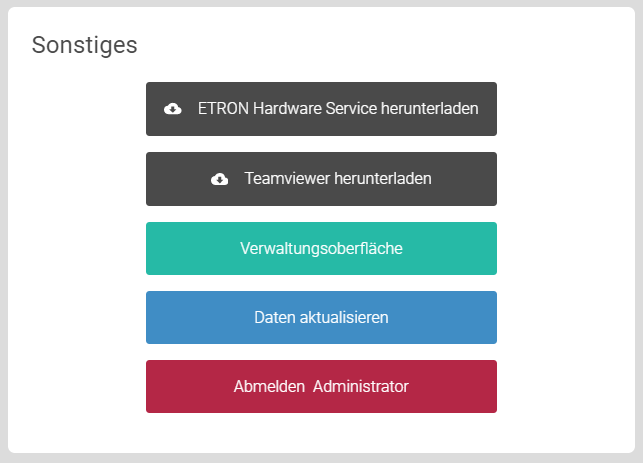
In den Einstellungen auf der Kassenoberfläche (POS) werden im Bereich **Sonstiges**, der 2 wichtige Software-Pakete zum Downloaden beinhaltet, angeboten. Bei beiden Paketen handelt es sich um Software, die ausschließlich auf Computern heruntergeladen und installiert werden kann, welche das Betriebssystem Microsoft Windows nutzen.
{% hint style="success" %}
Nähere Informationen der Hardwaremindestanforderungen für ETRON onRetail: [Anforderungen Kassen Hardware](/onretail-wiki/handbuch/drucker-and-hardware/anforderungen-hardware-performance-ausstattung.md)
{% endhint %}
## ETRON Hardware Service
Das ETRON Hardware Service (HWS) ist die Schnittstelle, die zwischen der ETRON onRetail Kassensoftware und Ihrer Peripherien/Hardware - z.B. Bondrucker und Etikettendrucker - kommuniziert. Das HWS sollte daher auch beim PC-Start immer ausgeführt und nie geschlossen werden.
Nähere Informationen: [ETRON Hardware Service (HWS)](/onretail-wiki/handbuch/drucker-and-hardware/etron-hardware-service.md)
## TeamViewer
Unser [ETRON Support](/onretail-wiki/sonstiges/support-kontaktieren.md) verwendet für die Fernwartung TeamViewer. Für Sie wird unser eigenes TeamViewer Quicksupport zum Downloaden angeboten. Falls bei Ihnen ein Problem an der Kassen- oder Verwaltungsoberfläche auftreten sollte, kann unser Supportteam durch TeamViewer als Fernwartungsapplikation auf Ihre Desktop-Oberfläche zugreifen.
{% hint style="success" %}
Nach dem Download empfehlen wir Ihnen, was Sie für eine flüssigere Zusammenarbeit mit unserem Supportteam noch machen können:
* Über unseren Chat  Ihre TeamViewer ID-Nummer bekanntgeben, damit unser Supportteam sie hinterlegen und für zukünftige Supportanfragen auf Ihren Bildschirm schneller zugreifen kann
* Die Datei "TVHO.exe" vom Downloads Order auf Ihr Desktop ziehen
* Den Dateinamen optional auf etwas anderes umbenennen, z.B. "TV", "TeamViewer", "Fernwartung"
* Das Programm muss bei Supportanfragen immer offen sein, damit zugriffen werden kann
{% endhint %}
---
# Agent Instructions
This documentation is published with GitBook. GitBook is the documentation platform designed so that both humans and AI agents can read, navigate, and reason over technical content effectively. Learn more at gitbook.com.
## Querying This Documentation
If you need additional information that is not directly available in this page, you can query the documentation dynamically by asking a question.
Perform an HTTP GET request on the current page URL with the `ask` query parameter, and the optional `goal` query parameter:
```
GET https://helpcenter.etron.info/onretail-wiki/handbuch/erste-schritte/hws-and-teamviewer.md?ask=&goal=
```
`ask` is the immediate question: it should be specific, self-contained, and written in natural language.
`goal` is optional and describes the broader end goal you are ultimately trying to accomplish on behalf of the user. GitBook uses it to tailor the answer towards what is most useful for that goal.
The response will contain a direct answer to the question and relevant excerpts and sources from the documentation.
Use this mechanism when the answer is not explicitly present in the current page, you need clarification or additional context, or you want to retrieve related documentation sections.